Options analysis: why Do Nothing is always Option 0
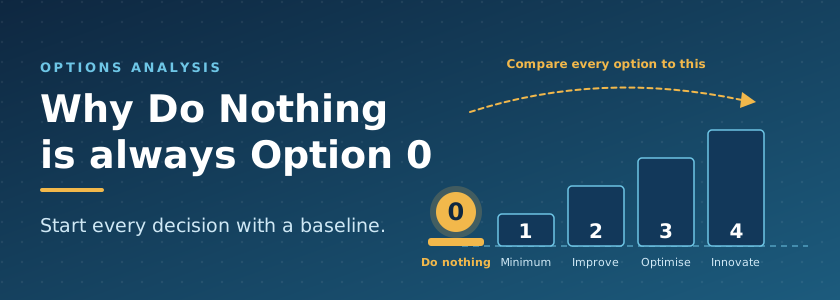
Every options analysis should start at Option 0: Do Nothing. It is the baseline that every other option is measured against, and it is the option most often left out. This is a bit of a longer article, because I have compiled a lot of my thinking to help with this area.
When a business needs to replace or upgrade a system, the conversation usually jumps straight to the product shortlist. Vendor A, Vendor B, maybe a custom build. Nobody writes down what happens if the organisation simply carries on as it is, so there is nothing honest to compare the shortlist against. The decision-makers end up comparing a known cost of change with an unknown cost of staying put, and “unknown” tends to be read as “zero”.
It is not zero. In this article I will show how I analyse Option 0, why Option 1 should be defined as “Do Minimum”, and how I use three lenses – Improve, Optimise and Innovate – to shape the remaining options, whatever products end up on the shortlist.
Why “Do Nothing” is Option 0
Option 0 is the honest baseline. It answers one question: what happens to the business if we make no change and no new investment? Every other option is then judged by how far it moves us from that position.

Treasury guidance uses the same idea, though the names vary. The UK Green Book starts from a do nothing option (the counterfactual) and falls back to “do minimum” where doing nothing is not possible. The South Australian Treasury guidelines call it the base case, and are careful to say it is not a “spend nothing” option – it is usually the minimum essential expenditure needed to keep the service going. The ACT Treasury makes the same point.
I keep both positions, because they answer different questions:
- Option 0 – Do Nothing: no decision, no new funding, no planned change. It shows where the risk goes if we simply carry on.
- Option 1 – Do Minimum: the realistic business-as-usual position. The least we would need to spend to keep the system supportable.
There are two reasons to insist on Option 0. First, nobody can weigh a $1.2 million project against “nothing” if nobody has costed “nothing”. Second, Option 0 is sometimes the right answer. If a system is being retired in twelve months, or the service is ending, doing nothing may be the sensible choice. But it has to be an informed choice, with the risk formally accepted by someone who has the authority to accept it.
READ ARTICLE: Technology Debt
Assessing Option 0: risk to the business, technology and people
Doing nothing really means accepting risk, so start there. Score each risk for impact and likelihood using your organisation’s own risk matrix (AS ISO 31000 is a sound foundation if you do not have one), and look through three lenses: the business, the technology and the people.
The ratings below are illustrative only. Use your own scale.
| Lens | Example risk if we do nothing | Impact | Likelihood (24 months) | Rating |
| Business | A critical process (payroll, orders, case management) fails with no workable fallback | Major | Possible | High |
| Business | We cannot meet a new customer, contract or regulatory requirement | Major | Likely | High |
| Technology | Vendor support ends and vulnerabilities go unpatched | Major | Likely | High |
| Technology | Newer systems cannot integrate, so data moves by hand | Moderate | Likely | Medium |
| People | Only one or two staff can support the system, and one leaves | Major | Possible | High |
| People | Workarounds, errors and frustration drive turnover | Moderate | Likely | Medium |
Two tips that make this table far more useful:
- Score at three horizons – now, 12 months and 36 months. Most options carry their risk up front, during the change. Option 0 carries its risk at the back, and it compounds. A rating of Medium today can be Extreme in three years.
- Name a risk owner for each line. If nobody is prepared to own the risk of doing nothing, that tells you something about the decision.
READ ARTICLE: Cybersecurity for boards – analogy to Health & Safety
The cost of doing nothing: operation, opportunity and compliance
Option 0 is never free. Cost it over the same period as every other option. The South Australian Treasury guidelines suggest an evaluation period of generally less than five years for information technology initiatives, so five years is a sensible default.
Costs of continued operation
- Licences, support and maintenance, which tend to rise as a product ages, including any extended support premiums.
- Infrastructure and hosting that cannot be retired while the system is still running – plus all the dependencies that it may have – the backup system, authentication, supporting infrastructure to run the infrastructure.
- Workarounds: the spreadsheets, re-keying and manual checks that staff build around the system’s gaps. The Shadow IT, the swivel-chair actions to get the data from one system to another. Cost these in hours of lost productivity and control.
- Incidents and downtime, using your own history from the last two years.
- Specialist contractors, whose rates rise as the skills become scarcer.
Opportunity cost
Opportunity cost is what the same money, and the same people, could have delivered instead. It also includes the benefits you cannot reach on the current platform: integration, analytics, self-service, or safe use of AI. A useful rule from the South Australian Treasury guidelines (2014): past spending on the old system is a sunk cost and should be left out. The money already spent is gone. Do not let it vote.

Compliance impact
This is the line that often turns Option 0 from “tolerable” to “not viable”.
- Essential Eight: the ASD maturity model expects applications that are no longer supported by vendors to be removed, and unsupported operating systems to be replaced. A system that cannot meet this holds the whole environment back.
- Privacy: the Privacy Act 1988 requires reasonable steps to protect personal information (Australian Privacy Principle 11). An unpatched system makes those steps harder to defend.
- Contracts and customers: many Adelaide organisations in defence, health and government supply chains must meet customer security requirements, and those requirements change faster than legacy systems do.
- Cybersecurity exposure: legacy systems not only no longer receive patches, but also the threat vector changes – targeted attacks on known pools of capability that are now vulnerable, and the attacker can take their time to exploit it.
READ ARTICLE: Focus on Compliance or Security?
Skills: who can support it today, and who can in three years?
A system is only as supportable as the people who understand it. Option 0 has to test skills on two fronts.

Incumbent skills. Who supports this system now? How many of them could fix a serious fault without help? How long have they been in the role, and is the knowledge written down or only in their heads? If the honest answer is “one person, and they are thinking about retirement”, you have a single point of failure – one with a pulse.
Skills in the marketplace. Are vendors still training and certifying people on this product? Are graduates learning it? Or is the pool shrinking, with the remaining specialists charging accordingly? Nationally, a 2025 Digital Transformation Agency survey of Australian Government systems found that about 20% were already facing workforce resourcing challenges, and that more than 40% were approaching or at the legacy stage.
Adelaide is a small pool
This is where Adelaide differs from Sydney or Melbourne. The 2019 South Australian edition of the ACS Digital Pulse put the state’s IT workforce at around 36,000 people, and noted that only a few hundred students graduated with IT qualifications from SA universities in a year. That pool is shared with defence, health, government and well-funded technology employers who can outbid a mid-sized organisation. Ask anyone in Adelaide who has tried to find a mechanic for a 30-year-old Holden Commodore: it can be done, but the parts, the skills and the time all cost more every year.
A quick skills sustainability test for Option 0:
- How many people in South Australia could support this system if our team left tomorrow?
- What would a replacement cost, and how long would they take to find and train?
- Can we source the skills remotely, and does our security and contractual environment allow it?
- Is the vendor or a third party still developing skills in this product?
If you cannot answer these confidently, the risk belongs in the Option 0 table.
READ ARTICLE: Skills evaporation
The people who live with an outdated system
The cost that rarely reaches the business case is the daily cost to the people who use the system. They are the ones who feel Option 0 first.
- Time: slow screens, duplicate data entry and manual steps add minutes to every task.
- Errors: workarounds create mistakes, and mistakes create rework and customer complaints.
- Onboarding: new starters need longer to learn a system that is not intuitive, and someone senior has to teach them.
- Behaviour: when the official tool is hard to use, people go around it. That is how Shadow IT and “poor process, also not followed” begin.
- Retention: capable people do not enjoy being paid to fight a system, and they have options.
Make it measurable. Ask a sample of users how many minutes a day the system costs them, then scale it. As an illustration, if 120 users each lose 20 minutes a day over 220 working days, that is 8,800 hours a year. At a loaded rate of $60 an hour, that is about $528,000 a year, and none of it appears on an IT budget line. Replace my numbers with yours.
READ ARTICLE: Poor process, also not followed
Option 1: ‘Do Minimum’ keeps it alive, and that is the problem
Option 1 is where most organisations quietly end up: keep the system alive with updates, customisations and patches. It looks responsible. Every single repair is reasonable.
The trouble is what they add up to. Each customisation makes the next upgrade harder, because it has to be tested, reworked or reapplied. Each patch adds a dependency that the next patch may break. Each workaround adds a process that only a few people understand. The system becomes more fragile and more expensive to support every year, while delivering exactly the same capability it did before.
| Option 0: Do Nothing | Option 1: Do Minimum | |
| What is funded | Current run costs only | Run costs plus the minimum to keep the system supportable |
| What you get | The system as it is, ageing | A supported system, for now |
| Main risk | Unmanaged: outage, security, skills and compliance | Managed but rising: fragility, cost and dependence on a few people |
| Cost trend | Low now, steep later | Steady increase every year |
When you cost Option 1, include everything that keeps the lights on:
- Mandatory security and vendor patches, and the testing they need
- Extended support or premium maintenance agreements
- Compatibility fixes for browsers, operating systems and integrations
- Contractor time for the customisations nobody can remove
- Extra monitoring, backup and disaster recovery effort
This matches the South Australian Treasury definition of a base case: not a spend-nothing option, but the minimum essential spend, which may include rising maintenance costs on ageing assets. Cost it honestly, with the rising curve, and it will often look far more expensive than the number in this year’s budget.
READ ARTICLE: That is what we have always done

‘Improve’, ‘Optimise’, ‘Innovate’: the options beyond the baseline
Once Option 0 and Option 1 are on the table, the real options begin. This is how I structure them: Improve | Optimise | Innovate.
The important point is that these are ambitions, not products. A shortlist of Vendor A, Vendor B and a custom build tells you what you might buy. ‘Improve’, ‘Optimise’ and ‘Innovate’ tell you what you are trying to achieve. The same product can sit in any of the three, depending on how far you intend to take it. Buying a new platform and rebuilding the old process inside it is an ‘Improve’ at best. Buying the same platform and redesigning the process around it is an ‘Optimise.’ Using it to offer something you could not offer before is an ‘Innovate’.
| Option | The ambition | What changes | Typical benefit | Main risk |
| Option 2: Improve | Fix what is broken | Move to a supported version or like-for-like replacement, remove unnecessary customisations, close known gaps | Supportable, secure, compliant | Same capability, and old habits carried across |
| Option 3: Optimise | Get more value from what we do | Redesign processes, automate, integrate, consolidate systems and licences | Lower run cost, faster work, fewer errors | Change effort is bigger than the technology effort |
| Option 4: Innovate | Do what we could not do before | New capability, new service model, new use of data or AI | New revenue, better outcomes, competitive advantage | Highest cost, highest uncertainty, needs strong sponsorship |
A few rules I follow when I use these three:
- Ask the ambition question first, then the product question. “Which system?” is a procurement and technology decision. “Improve, Optimise or Innovate?” is a business decision.
- Be honest about the label. A lift-and-shift to the cloud is usually an ‘Improve’. Calling it ‘Innovate’ does not make it one.
- Options build on each other. Every ‘Improve’ should fix the baseline problems. ‘Optimise’ adds process change. ‘Innovate’ adds new capability. Some organisations do them in that order over several years.
- Assess each against Option 0. If an option cannot show it does better than doing nothing on risk, cost and people, it does not belong on the shortlist.
READ ARTICLE: Digital Transformation Roadmap: From Legacy to Innovation
Bringing it together: score every option against Option 0
A simple multi-criteria analysis keeps the discussion honest. The South Australian Treasury guidelines recommend at least three short-listed options including the base case, and stress that bias should be kept out of the analysis. Here is how I run it:
- Agree the criteria and weightings before you look at the options. Typical criteria are risk reduction (business, technology and people), five-year cost, compliance, skills sustainability, benefits, and deliverability including change load.
- Score Option 0 first, at 12 and 36 months. It sets the baseline everyone else is compared against. This informs the business of where they are, and creates a case for change.
- Score Option 1 (‘Do minimum’) next, with its rising cost curve. This helps the business know the impact of keeping it alive.
- Define ‘Improve’, ‘Optimise’ and ‘Innovate’ as ambitions, then attach the products that could deliver each one.
- Test the ranking. Change the weightings and see whether the order holds. If one number flips the answer, say so.
- Record the assumptions, the risk owner and the decision, and set a date to re-score Option 0.
The reward for this discipline is a decision that stands up when someone asks, six months later, why you did not just keep the old system going.
How does your organisation treat Option 0 – as a genuine option, or as a formality? I would like to hear how it plays out in your experience.
