How to learn AI skills: a free, self-paced guide for office workers
Most people learn to use AI by trial and error, and a lot of them do it with whatever free tool they found first. That works, up to a point. A little structured learning will get you better results, faster, and help you avoid the mistakes that cause real harm, such as pasting confidential information into the wrong tool.
This guide is for staff in mid-sized businesses and not-for-profits, where there is rarely an AI specialist or a training budget. It collects free, self-paced courses that teach everyday AI skills for office work, and puts them in a sensible order. If you are a manager choosing training for a team, it will save you hours of searching. If you are deciding how to introduce AI in your organisation, read How to get started in AI alongside it.
A few notes before you begin:
- Time: plan on two to three hours a week for four to six weeks. The suggested path near the end shows how.
- Cost: every course here is free to take at the time of checking, although some ask you to create a free account, and some certificates cost money.
- Change: courses are renamed, updated and withdrawn often, so check the details on each provider’s page before you commit.
I use both Claude and Copilot 365, but the training that really got me started was the NSW TAFE Introduction to AI, which is free, and gave me the start that I needed.

Before you start: five ground rules
Learning to use AI is safe when you set a few rules first.
- Use an approved tool. Ask your manager or IT provider which AI tools your organisation allows. Free personal accounts often have fewer controls than business versions, and people who go around the rules create Shadow IT.
- Practise on non-sensitive material. Use public information, made-up examples or text you would be comfortable seeing on a website. The Office of the Australian Information Commissioner recommends that organisations do not enter personal information, particularly sensitive information, into publicly available generative AI tools.
- Keep client, donor, staff and financial information out of tools your organisation has not approved.
- Check the answers. AI makes mistakes and invents information, as I explained in The need for Responsible AI.
- Treat it as a new colleague. Give it clear instructions and check its work, the idea behind AI is a junior colleague.
Step 1: Learn what AI is and is not
Before you learn a particular tool, spend a few hours understanding what generative AI can and cannot do. These courses are vendor-neutral.
- AI Essentials: Getting Started with Artificial Intelligence (TAFE SA). A free, online, self-paced micro-credential covering what AI is, how it is used, privacy and ethical use, and trying common tools. Allow 5 to 10 hours, and you have 90 days to finish once registered. A certificate is issued. It is aimed at the general public with no technical background, which makes it a good first step for South Australians.
- Introduction to Generative AI (Google Skills). A short video course on what generative AI is, how it is used and how it differs from traditional machine learning. No charge, beginner level, with a badge. It takes under an hour.
- AI for Everyone (DeepLearning.AI, on Coursera). A non-technical course by Andrew Ng, aimed at managers and professionals who want to understand AI’s impact on work. About 6 to 7 hours. It is free to audit, but the certificate costs money.
- Elements of AI (University of Helsinki and MinnaLearn). A free online course with no maths or programming, with about 30 hours of material and a free certificate. It goes deeper into how AI works than the others, so treat it as optional for most office workers.

Step 2: Learn one assistant well
Pick the assistant your organisation has approved and learn it properly. Skills such as giving clear instructions, supplying context and checking the output carry over to the others. The tools are listed alphabetically.
ChatGPT (OpenAI)
OpenAI Academy offers free, self-paced courses to anyone with a ChatGPT account, and the free plan is enough. See OpenAI’s course list.
- AI Foundations: about 60 to 75 minutes. AI basics, prompting, context and responsible use, using a real task of your own. For beginners.
- Applied AI Foundations: about 75 to 90 minutes. Turning a task into a repeatable workflow with review points. For people who have the basics.
- Agents and Workflows: about 2 hours, for those ready to direct more structured workflows.
Claude (Anthropic)
Anthropic’s free Claude Academy is at academy.claude.com, and its older courses are listed on anthropic.skilljar.com. Courses carry completion badges.
- Claude 101: 13 lessons, about 2.5 hours. Everyday use, from your first conversation and prompting to projects and connected tools.
- AI Fluency: Framework and Foundations: 14 lessons, about 4 hours. A vendor-neutral way of working with AI using four habits: Delegation, Description, Discernment and Diligence.
- AI Fluency for small businesses: 8 lessons, about 3.5 hours, for owners and staff applying AI to everyday operations.
- AI Fluency for nonprofits: 9 lessons, about 4 hours, covering research, writing, data analysis and privacy for nonprofit staff.
Copilot M365 (Microsoft)
Microsoft Learn is free to take. The Get started with Microsoft 365 Copilot learning path has three modules for beginners with no prerequisites: an introduction (including responsible use), practical use across Microsoft 365 apps, and best practices for optimising and extending Copilot. The page does not give a total time, so allow a couple of hours. You can practise much of it only if your organisation has given you Copilot access.
Gemini (Google)
- Introduction to Generative AI: under an hour, no charge, badge.
- Google AI Essentials: a beginner course with a certificate, aimed at using generative AI tools to speed up daily tasks. It is not marked “no charge” on Google’s page, so check the cost before you enrol.
- AI Power-Ups for Google Workspace: 15 minutes, no charge, badge. Summarising emails, finding information and drafting replies with Gemini.
Grok (xAI)
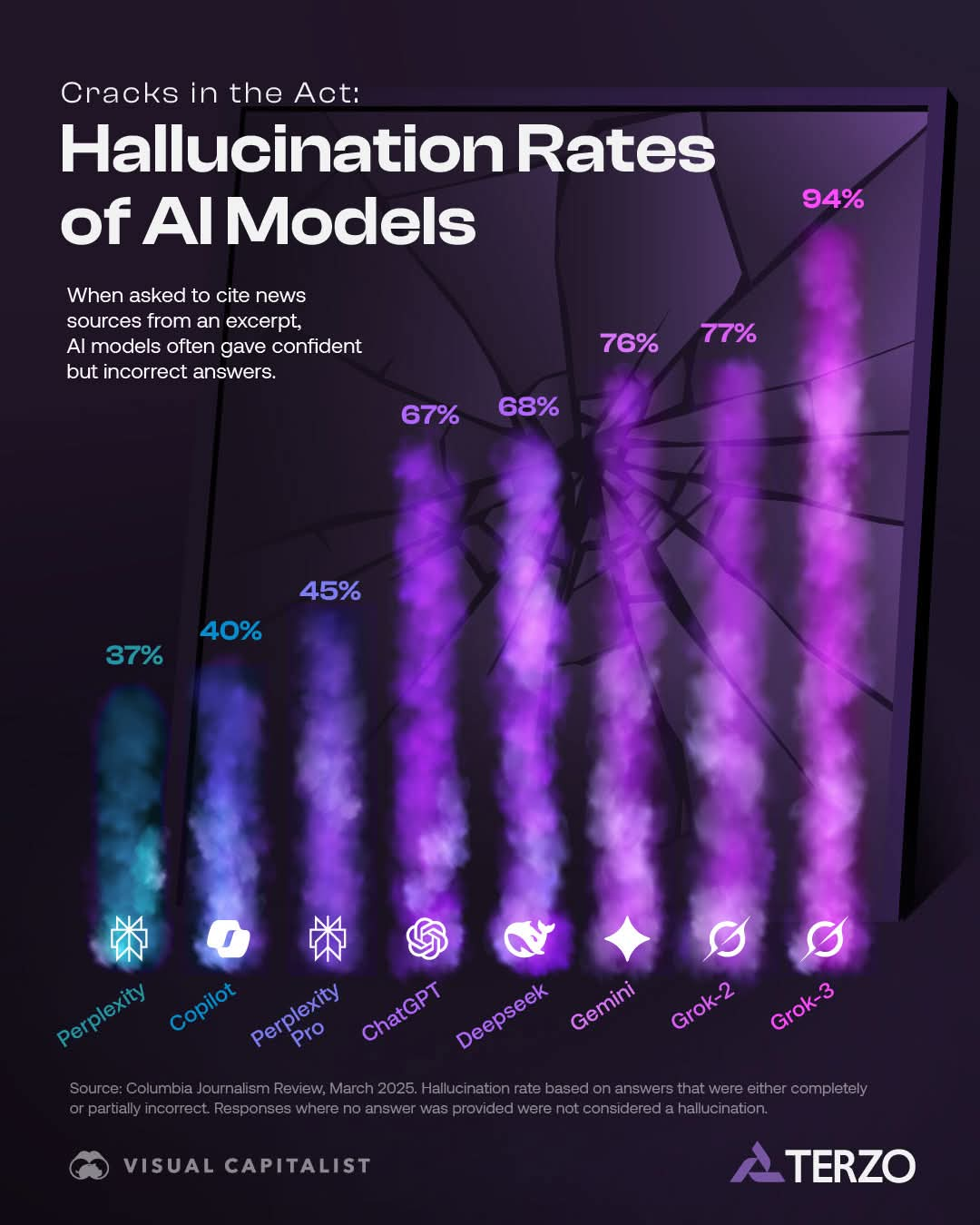
To be honest, I could not find an official beginner course for Grok. xAI publishes developer documentation at docs.x.ai, which is aimed at people building with the API. A third-party mini-course, Grok Mastery (five short lessons, about 35 minutes, free certificate), covers setup and prompting, but it is not from xAI, so judge its quality for yourself. Check your organisation’s policy before using Grok for work. I’m not a big fan, based on the statistics about the high incidence of hallucinations in Grok
Step 3: Use AI inside the tools you already have
Most office work happens in email, documents, spreadsheets and meetings, so learn the AI features built into the suite your organisation pays for. What you see depends on your licence, so ask your IT provider what is switched on.
Microsoft 365
- Explore the possibilities with Microsoft 365 Copilot (Microsoft Learn, free, beginner). Practical use across Word, Outlook, PowerPoint, Excel and Teams, plus Copilot Chat. It is also the second module of the learning path in Step 2.
Google Workspace
- Google Workspace with Gemini (Google Skills). A learning path of about five hours on using Gemini across Workspace. The page marks it as partially free, so check what is included without a subscription.
- AI Boost Bootcamp: How to Use Gemini at Work 101 (Google Skills). Beginner training based on Google’s own internal programme, covering planning, presentations and meetings across Workspace. Check the page for length and cost.
- Make AI Work for You. An expert-led workshop for small business owners, at no charge.
Five everyday tasks to practise on
- Summarise a long email thread and list the decisions and actions.
- Draft a first version of meeting notes from your own rough notes.
- Turn a page of notes into a one-page brief for your manager or board.
- Ask for help explaining or fixing a spreadsheet formula.
- Rewrite a document for a different audience, such as customers or volunteers.
In each case, read and correct the result before you use it. The skill you are building is judgement as much as prompting.

Step 4: Learn the rules of safe use, with Australian resources
Skills without safe habits can do harm. Set aside an hour or two to read the guidance that applies where you work.
- Guidance on privacy and the use of commercially available AI products (OAIC). How the Privacy Act and the Australian Privacy Principles apply when your organisation uses AI products, including the recommendation not to enter personal information into publicly available tools. Reading time: an hour or less.
- Guidance for AI Adoption (National AI Centre). Six essential practices for responsible AI governance, published in October 2025. A “Foundations” version is written for organisations getting started, and an AI policy template, screening tool and systems register template accompany it. For managers and whoever owns AI in your organisation.
- Introduction to Artificial Intelligence (CSIRO National AI Centre and TAFE NSW’s Institute of Applied Technology Digital). A free, non-technical microskill of about 2.5 hours, covering terminology, risks, misconceptions and Australian case studies. It was offered through a scholarship scheme, so check that it is still open.
- Learn about AI (South Australian Government Office for AI). Points to the TAFE SA course, and describes a separate e-learning course for South Australian Government employees.
The vendor courses cover this too. The Microsoft path above includes responsible use, Claude’s AI Fluency courses teach “Diligence” and cover privacy and data, and Google offers a short Introduction to Responsible AI video.
For how to introduce AI across a team, with a first 90 days, see How to get started in AI.

Step 5: Going further
Once you are comfortable, there are three directions to go in. You do not need any of them for everyday productivity.
Understand AI more deeply
- Elements of AI: Building AI is the follow-on course from the University of Helsinki, with about 50 hours of hands-on projects.
- Introduction to Large Language Models (Google Skills) is an intermediate course on how large language models work and how prompt tuning improves them. No charge, badge.
- DeepLearning.AI’s short courses are bite-sized, project-based courses built with partner companies. The videos are free to watch, and some courses, such as one on prompting for everyone, are aimed at beginners. Check each course page for length and cost.
- Harvard’s CS50 introduction to AI with Python is free to audit on edX, but it needs programming, so it suits people who want to build, not just use.
Lead AI in your organisation
- Innovating with Google Cloud Artificial Intelligence is a beginner course for leaders on using AI to transform an organisation. Badge.
- The Guidance for AI Adoption in Step 4 is the best practical reading for managers.
Try other products that can help you work
- Perplexity is an answer engine that shows its sources, which is useful for research where you want to check the references.
- Gemini Notebook is a research assistant that works from documents you give it.
- Whichever tool you try, apply the same rules from the start of this guide, and check that your organisation allows it.
The tools will keep changing. The lasting skills are clear instructions, supplying context, checking results and knowing what not to share.
A simple six-week starter path
This path assumes about two to three hours a week and one approved assistant. Adjust it to your tool and your role.
| Week | Focus | What to do | Time |
| 1 | Ground rules and basics | Read the five ground rules. Take Google’s Introduction to Generative AI. Start the TAFE SA AI Essentials course. | About 2 hours |
| 2 | Finish the basics | Continue the TAFE SA course, which takes 5 to 10 hours in total across weeks 1 to 3. | 2 to 3 hours |
| 3 | Your assistant | Take the first course for your approved tool: ChatGPT AI Foundations, Claude 101, Get started with Microsoft 365 Copilot, or AI Power-Ups for Google Workspace. | 1 to 3 hours |
| 4 | Working habits | Take AI Fluency: Framework and Foundations (about 4 hours, which you can split over weeks 4 and 5), or ChatGPT’s Applied AI Foundations. | 2 to 3 hours |
| 5 | Apply to real work | Choose one of the five everyday tasks. Time it before and after using AI, and write down what you had to correct. | About 2 hours |
| 6 | Safe use and sharing | Read the OAIC guidance, and write one page of team rules, using the National AI Centre’s policy template as a start. Share what you learned with colleagues. Nonprofit and small business staff can take the matching AI Fluency course. | 2 to 3 hours |
If you only have five hours, do this: Google’s Introduction to Generative AI (under an hour), the first course for your approved assistant (one to two and a half hours), the OAIC guidance (an hour or less), and one real task of your own (about an hour).
One habit is worth building from the first day: keep a short notebook of prompts that worked, and notes on where the AI got it wrong. It becomes your own reference guide, and something you can share with colleagues.

Course comparison table
Details were checked on 7 October 2026. Course pages change often, so confirm time and cost on the provider’s page.
| Course | Provider | Time | Best for | Cost |
| AI Essentials: Getting Started with AI | TAFE SA | 5 to 10 hours | Anyone new to AI, especially South Australians | Free |
| Introduction to Artificial Intelligence | CSIRO National AI Centre and TAFE NSW IATD | About 2.5 hours | Workers and small business owners | Free (check availability) |
| Introduction to Artificial Intelligence | TAFE NSW | About 2.5 hours | Anyone new to AI | Currently free |
| Introduction to Generative AI | Google Skills | Under 1 hour | Beginners | No charge |
| AI for Everyone | DeepLearning.AI | About 6 to 7 hours | Managers and professionals | Free to audit, certificate paid |
| Elements of AI | University of Helsinki | About 30 hours | Curious beginners wanting depth | Free |
| AI Foundations | OpenAI Academy | 60 to 75 minutes | Beginners using ChatGPT | Free (ChatGPT account) |
| Applied AI Foundations | OpenAI Academy | 75 to 90 minutes | People who know the basics | Free (ChatGPT account) |
| Claude 101 | Anthropic | About 2.5 hours | Everyday users of Claude | Free |
| AI Fluency: Framework and Foundations | Anthropic | About 4 hours | Anyone using AI at work | Free |
| AI Fluency for small businesses | Anthropic | About 3.5 hours | Owners and staff of small businesses | Free |
| AI Fluency for nonprofits | Anthropic with GivingTuesday | About 4 hours | Nonprofit staff | Free |
| Get started with Microsoft 365 Copilot | Microsoft Learn | Three modules, time not stated | Microsoft 365 users | Free |
| AI Power-Ups for Google Workspace | Google Skills | 15 minutes | Gmail and Workspace users | No charge |
| Google AI Essentials | Grow with Google | See provider page | Beginners | Check cost |
| Google Workspace with Gemini | Google Skills | About 5 hours | Workspace users | Partially free |
| Grok Mastery (unofficial) | freeacademy.ai | About 35 minutes | People using Grok | Free |
| Guidance for AI Adoption | National AI Centre | Reading | Managers and AI owners | Free |
| OAIC privacy guidance on AI products | OAIC | About an hour of reading | Anyone using AI at work | Free |
Have you taken one of these courses, or found a better one? I would like to hear what worked for you.
