Non-functional requirements explained: a new architect’s guide, with an AI project example
When a business asks for an AI solution, the request almost always describes what it should do. Summarise our emails. Draft our reports. Answer staff questions about policy. What it rarely says is how well, how quickly, how safely and at what cost.
That second half has a name: non-functional requirements, or NFRs. For someone new to enterprise architecture, this is the idea that changes how you read every project request. A solution can do everything on the feature list and still fail, because it is too slow, too unreliable, too expensive, or because nobody trusts it with their data.
With AI, this matters even more. NFRs are what separate a pilot that people trust and keep using from one that is quietly withdrawn, as I described in my article on why AI systems get withdrawn. This guide explains what NFRs are, lists the common ones, and shows how to use them to define a project that improves employee productivity and business efficiency.
What non-functional requirements are
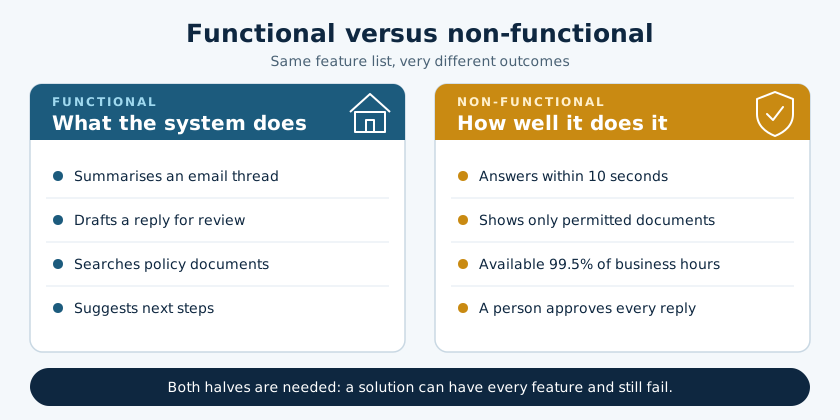
A functional requirement says what a system does: “the assistant summarises an email thread”. A non-functional requirement says how well it must do it, and under what conditions: how fast, how reliably, how securely, how accessibly, at what cost, and within which rules. NFRs are also called quality attributes.
Think of building a house. The floor plan says how many rooms there are and where the kitchen goes. That is the functional design. The non-functional requirements are the bushfire rating if you build in the Adelaide Hills, the electrical capacity, the insulation, the wheelchair access and the council approvals. The house can have all the right rooms and still be unsafe, uncomfortable or unlawful to occupy.
This is why NFRs matter to an architect. They are often the strongest influence on design and cost. A system that must be available around the clock, protect health records and serve thousands of people at once is a very different (and more expensive) thing from one that is used by five people in business hours, even if the features are identical. They are also painful to fix late. It is easy to add a menu item to a finished system, and much harder to add security or scalability.
Make them measurable
The most common mistake is a vague requirement that nobody can test. “The system should be fast” cannot be accepted or rejected. “95% of requests are answered within five seconds, with 50 people using it at once” can.
A handy checklist
The international software quality standard ISO/IEC 25010, in its 2023 edition, defines nine characteristics of a quality product: functional suitability, performance efficiency, compatibility, interaction capability (what used to be called usability), reliability, security, maintainability, flexibility (portability) and safety. You do not need to memorise it, but it is a useful list to run through when you are asked “have we thought of everything?”
NFRs are a negotiation. The business decides how much reliability or security it is willing to pay for, and the architect shows what each level costs. That conversation is the real work.
Common non-functional requirements, with examples
Here are the ones I now look for on every project. The targets are illustrations, so set your own with the business.
| NFR | The question it answers | Example of a measurable requirement |
| Performance | How fast must it respond? | 95% of requests answered within 5 seconds with 50 people using it at once |
| Capacity and scalability | How many users and how much data, now and later? | Supports 300 users now and 600 within two years without redesign |
| Availability | When must it be working? | Available 99.5% of business hours each month |
| Reliability and recovery | What happens when it fails, and how quickly must it return? | Restored within 4 hours, with no more than 1 hour of data lost (see my Business Impact Analysis questionnaire template) |
| Security | Who can see and change what, and how is it protected? | Multi-factor sign-in for all users, role-based access and data encrypted in transit and at rest, in line with the Essential Eight |
| Privacy and data protection | Where is personal information stored, and for how long? | Personal information stays in the approved environment and is deleted after the retention period |
| Compliance | Which laws, standards and contract terms apply? | Meets the Privacy Act, records rules and customer security clauses |
| Usability and accessibility | Can everyday users succeed, including users with disability? | A new user completes the main task unaided within 10 minutes, and the interface meets accessibility guidelines |
| Integration and compatibility | What must it work with? | Connects to the email and document systems already in use through standard interfaces |
| Supportability and maintainability | Who looks after it, and can they? | Faults can be diagnosed from logs, documentation exists, and support skills are available locally |
| Auditability | Can we see what happened and who did it? | Every action is logged and kept for 12 months |
| Portability and exit | Can we leave? | Data can be exported in open formats within 30 days of request |
| Cost | What will it cost to run? | Run cost under an agreed amount per user per month |
Notice that most of these are really business questions. How long can we be without this system? What is the cost of a leak? Who must be able to use it? An architect’s job is to turn those answers into numbers that a team can build to and test.
The NFRs that matter most for AI
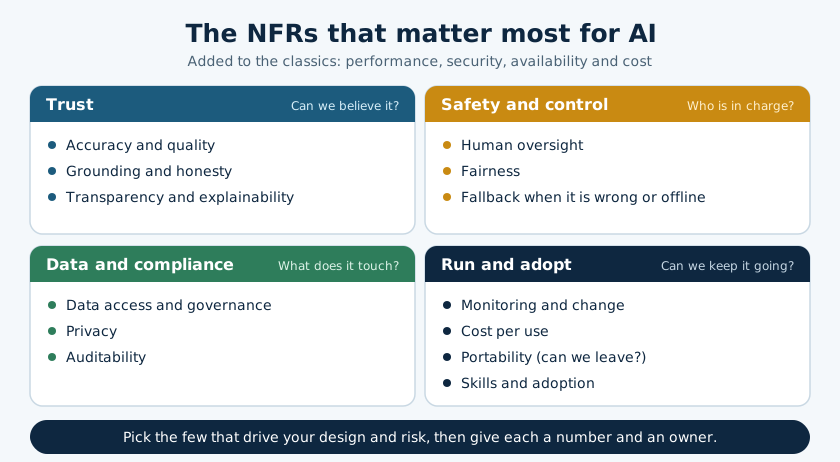
AI keeps the classic NFRs and adds a few of its own, because its answers are probabilistic, depend on data and can change without anyone touching the code. The US National Institute of Standards and Technology’s AI Risk Management Framework describes seven characteristics of trustworthy AI: valid and reliable, safe, secure and resilient, accountable and transparent, explainable and interpretable, privacy-enhanced, and fair with harmful bias managed. They make a good starting list for AI requirements.
| AI-specific NFR | What to specify | Example of a measurable requirement |
| Accuracy and quality | How good must the output be, and how will you measure it? | At least 90% of drafts need only minor edits, judged on a monthly sample of 100 |
| Grounding and honesty | Must answers rely on your sources, and admit when they cannot? | Answers cite the source document, and say “I don’t know” when none is found |
| Human oversight | Which outputs need a person’s approval? | A person reviews every message before it goes outside the organisation |
| Transparency and explainability | Can users see where an answer came from? | Users can see the sources used, and are told when AI is involved |
| Fairness | Could the output treat people unequally? | Tested on varied cases, and not used for decisions about people without human review |
| Data access and governance | What data can it see? | It can only retrieve documents the person asking is already allowed to see |
| Privacy | What happens to the data entered? | No personal information in unapproved tools, and the supplier may not train on our data |
| Auditability | Can you see what it was asked and what it said? | Prompts and answers logged for 12 months, with restricted access |
| Monitoring and change | How will you know it has got worse? | Quality re-tested monthly and after every model or supplier change, with a rollback plan |
| Cost per use | What does each task cost? | Under an agreed cost per task, with usage caps |
| Fallback | What if it is wrong or offline? | Staff can complete the work without it, and a human path exists |
| Portability | Can you change supplier? | Prompts, settings and data can move to another provider within 90 days |
| Skills and adoption | Are people ready to use it well? | Every user completes a short course before getting access |
A few of these deserve a comment. Human oversight is the NFR behind the delegation ladder in AI is a junior colleague: decide how much the AI may do alone, and for which tasks. Fallback is the lesson from AI customer service systems that were withdrawn when there was no easy route to a person. Privacy should reflect the Office of the Australian Information Commissioner’s guidance, which recommends that organisations do not enter personal information into publicly available generative AI tools. And skills is why I wrote a guide to free AI courses for office workers.
The Australian Government’s Guidance for AI Adoption lists six essential practices: decide who is accountable, understand impacts, measure and manage risks, share essential information, test and monitor, and maintain human control. Each one becomes easier to deliver, and to prove, once it is written as a measurable requirement.
Using NFRs to define an AI project
Here is how I would use NFRs to turn a vague wish, “let’s use AI to be more productive”, into a project that can be built, tested and trusted. The example is an AI assistant for the enquiries team of a mid-sized business or not-for-profit. It summarises incoming emails, drafts replies and searches policy documents.
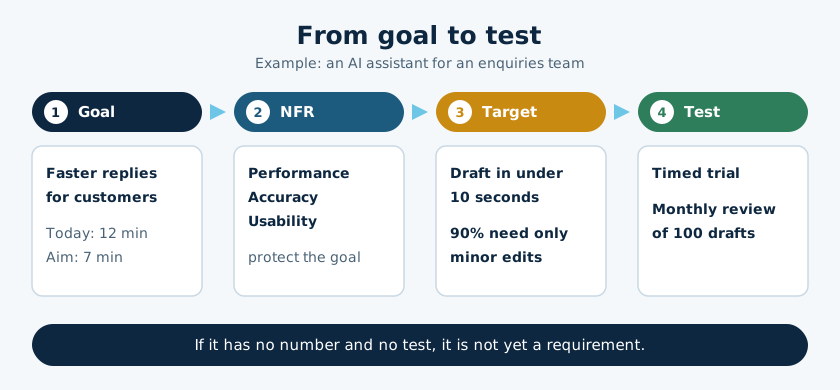
Step 1: Start with outcomes and a baseline. Before any technology, write down what success looks like and what the position is today. For example: reduce the average time to answer an enquiry from 12 minutes to 7, handle 20% more enquiries with the same staff, keep customer satisfaction at its current level, and have no privacy incidents. The figures here are illustrative. Measure the real baseline first.
Step 2: Turn each goal into the NFRs that protect it.
| Goal | NFRs that protect it | Example target | How you test it |
| Faster replies (productivity) | Performance, accuracy, usability | Draft in under 10 seconds, with 90% needing only minor edits | Timed trial and a monthly review of 100 drafts |
| More enquiries handled (efficiency) | Capacity, availability, integration | Handles 300 users at peak, and 99.5% available in business hours | Load test and uptime reporting |
| Customer trust (value) | Human oversight, transparency, fairness | A person approves every outgoing reply, and sources are shown | Audit of a sample of sent replies |
| No harm (risk) | Security, privacy, auditability, compliance | No personal data in unapproved tools, with logs kept for 12 months | Access review and log check |
| Staying in control | Fallback, portability, cost per use | Work continues without AI, data exportable within 90 days | Fallback drill and supplier terms |
Step 3: Use them to compare options. Different solutions meet NFRs differently. A tool built into your existing office software may score well on integration and security, and a standalone product may be better on features and worse on exit. Score each option against the NFRs, and against doing nothing, as I describe in my article on options analysis. The NFRs also show whether you are aiming to improve, optimise or innovate.
Step 4: Turn them into acceptance criteria and stop conditions. Agree in advance what the pilot must achieve to continue, and what result means pause or roll back, such as accuracy falling below the target or a privacy incident. That protects the organisation, and the project.
Questions to ask your stakeholders
- What would a good outcome look like, and how will we measure it?
- What data will the AI see, and who is allowed to see that data?
- What is the worst thing it could say or do, and what would that cost us?
- Which outputs need a person’s approval?
- How accurate must it be, and who will check?
- How long can we be without it?
- Which laws, contracts and policies apply?
- Who supports it, and do we have the skills locally?
- What does it cost per use, and who pays?
- How would we change supplier, or stop using it?
Common mistakes, and a starter checklist
Mistakes to avoid
- Vague requirements. “Secure”, “fast” and “reliable” mean nothing until they have a number.
- Discovering them late. NFRs raised during testing or after go-live cost far more than those set in the design.
- Too many. Twelve well-chosen NFRs with owners beat a hundred copied from another project. Focus on the few that drive the design and the risk.
- No owner and no test. Every NFR needs a named person who accepts it, and a way to check it.
- Accepting the supplier’s defaults. A vendor’s standard settings are their requirements, not yours.
- Treating a demo as proof. AI performs well on the demo script. Test it on your own messy, real examples, including the edge cases.
- Setting and forgetting. AI services change. Re-test after each model or supplier change.
A starter checklist before you approve an AI project
- Outcomes and baseline measures are written down.
- Each outcome has the NFRs that protect it, with numbers.
- Data access, privacy and compliance have been checked against your policies and the law.
- There is a defined level of human oversight.
- There is a fallback that works without the AI.
- The pilot has success measures and stop conditions.
- Someone is accountable, and people have been trained.
What I would tell the next new architect
If you are new to enterprise architecture, here is the short version. Features tell you what people want. NFRs tell you what they will accept, and what it will cost to give it to them. Learn to ask the unglamorous questions early: how fast, how safe, how available, who is responsible, what if it goes wrong, and how do we get out.
With AI, the same discipline applies, with a few extra attributes. Accuracy, human oversight, transparency and data governance are not optional extras. They are what make the difference between an AI project that lifts productivity and one that people stop using.
